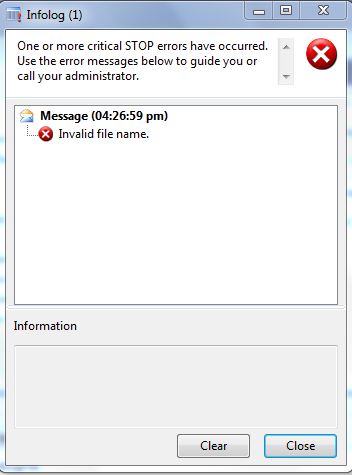
This is the error message you normally get when you use the the wrong file convention, As in the example below I used "\" instead of "\\" in the file path, as AX only excepts "\\":
static void ReadingFile(Args _args)
{
TextIo inputFile;
//This syntax is for reading file in a local machine, we always use "\\" instead of "\"
// AX does not read "\"
inputFile = new TextIo("C:\test.txt", 'R');
if (inputFile)
{
info("File found");
}
}
Solution:
static void ReadingFile(Args _args)
{
TextIo inputFile;
//This syntax is for reading file in a local machine, we always use "\\" instead of "\"
// AX does not read "\"
inputFile = new TextIo("C:\\test.txt", 'R');
if (inputFile)
{
info("File found");
}
}
This is the correct way. Same goes for network path, you need to use "\\\\" instead of "\\", as shown below:
static void ReadingNetworkFile(Args _args)
{
TextIo inputFile;
//This syntax is for reading file in a local machine, we always use "\\" instead of "\"
// AX does not read "\"
inputFile = new TextIo("\\\\AXServer\\test.txt", 'R');
if (inputFile)
{
info("File found");
}
}
Showing posts with label AX. Show all posts
Thursday, 24 May 2012
Stack trace: Invalid attempt to call WinAPI::findFirstFile running in CIL on the client.
Stack trace: Invalid attempt to call WinAPI::findFirstFile running in CIL on the client
This error you will normally encounter when running a batch job. The issue is that batch processing doesn't suppport WINAPI::findFirstFile method. Actually I was trying to find a file in the folder and moving to some other folder, you can use this alternative:
public void run()
{
System.IO.DirectoryInfo di;
System.Type arrayType;
System.Array array;
System.IO.FileInfo fi;
FilePath filePath, moveFilePath, shortFile;
int i;
int l;
;
super();
baseFolder = tEC_InterfaceSetup.TEC_DefaultFolder +"\\";
di = new System.IO.DirectoryInfo(baseFolder);
arrayType = System.Type::GetType("System.IO.FileInfo");
array = System.Array::CreateInstance(arrayType, 1);
array = di.GetFiles("*" + #txt);
l = array.get_Length();
if (l > 0)
{
//Find the files in the base folder and iterate.
for (i = 0; i < l; i++)
{
fi = array.GetValue(i);
mainFolder = fi.get_FullName();
foundBaseFileName = fi.get_Name();
//**********Your logic************
}
InterfaceTransfer::moveFile(foundBaseFileName , moveFilePath);
}
}
server static void moveFile(str fileName, str newFileName)
{
#File
Set permissionSet;
permissionSet = new Set(Types::Class);
permissionSet.add(new FileIOPermission(fileName,#io_write));
permissionSet.add(new InteropPermission(InteropKind::ClrInterop));
CodeAccessPermission::assertMultiple(permissionSet);
System.IO.File::Move(fileName, newFileName);
CodeAccessPermission::revertAssert();
}
Hope this helps.
This error you will normally encounter when running a batch job. The issue is that batch processing doesn't suppport WINAPI::findFirstFile method. Actually I was trying to find a file in the folder and moving to some other folder, you can use this alternative:
public void run()
{
System.IO.DirectoryInfo di;
System.Type arrayType;
System.Array array;
System.IO.FileInfo fi;
FilePath filePath, moveFilePath, shortFile;
int i;
int l;
;
super();
baseFolder = tEC_InterfaceSetup.TEC_DefaultFolder +"\\";
di = new System.IO.DirectoryInfo(baseFolder);
arrayType = System.Type::GetType("System.IO.FileInfo");
array = System.Array::CreateInstance(arrayType, 1);
array = di.GetFiles("*" + #txt);
l = array.get_Length();
if (l > 0)
{
//Find the files in the base folder and iterate.
for (i = 0; i < l; i++)
{
fi = array.GetValue(i);
mainFolder = fi.get_FullName();
foundBaseFileName = fi.get_Name();
//**********Your logic************
}
InterfaceTransfer::moveFile(foundBaseFileName , moveFilePath);
}
}
server static void moveFile(str fileName, str newFileName)
{
#File
Set permissionSet;
permissionSet = new Set(Types::Class);
permissionSet.add(new FileIOPermission(fileName,#io_write));
permissionSet.add(new InteropPermission(InteropKind::ClrInterop));
CodeAccessPermission::assertMultiple(permissionSet);
System.IO.File::Move(fileName, newFileName);
CodeAccessPermission::revertAssert();
}
Hope this helps.
Subscribe to:
Posts (Atom)