Friday, 31 August 2012

AX2009 Server migration from one machine to another

Server migration of AX2009 is easier if you do it through SQL Backup/Restore. Following are the steps:
  1. Go to the SQL server of the database from the where you need to take the backup.
  2. Backup the full database.
  3. Go the the SQL server of the database on which you need to restore the database.
  4. Restore the full database.
  5. Copy the Appl folder from  C:\Program Files\Microsoft Dynamics AX\50\Application
  6. In server configuration you need to point to this application path as shown above.
Now you need to change the server name at the database level from SQL as shown below:

Select * from dbo.BATCHSERVERGROUP
--Update BATCHSERVERGROUP set SERVERID = '01@NewAOS' where SERVERID = '02@OldAOS'

Select * from BATCHSERVERCONFIG
--Update BATCHSERVERCONFIG set SERVERID = '01@NewAOS' where SERVERID = '02@OldAOS'


Select * from SYSCLUSTERCONFIG
--Update SYSSERVERCONFIG set SERVERID = '01@NewAOS' where SERVERID = '02@OldAOS'

Select * from SYSSERVERSESSIONS
--Delete dbo.SYSSERVERSESSIONS
Select * from BATCH
--Update BATCH set SERVERID =  '01@NewAOS' where SERVERID = '02@OldAOS'

Select * from SYSCLIENTSESSIONS
--delete SYSCLIENTSESSIONS

Hope this helps.

Cannot select a record in Customer parameters (CustParameters). An unsupported NULL value has been selected from the database."

Recently our customer came up with one of the issues,  the issue was that some of the users where not able to access the Sales order and Customer master data. They use to get this message:


"Cannot select a record in Customer parameters (CustParameters). An unsupported NULL value has been selected from the database."

The reason was usage data, there was something wrong with their usage data. I tried to clear the usage data and close AX and open again, issue was resolved.

Steps to clear usage data:
  1. Open AX
  2. Go to Tools
  3. Select Option
  4. Click "Usage Data"
  5. In th General tab click "Reset" (Note that all the user changes will be gone after reset).


Thursday, 24 May 2012

How to merge and get vendor master/ customer master address using X++ code in AX 2012

In AX 2012 there is method formatAddress in LogisticsPostalAddress table. This method will merge all the details of the address. In my case I was updating the vendor address so I created a job as shown below:


//Something like this:

logisticsPostalAddress.Address = logisticsPostalAddress::formatAddress(logisticsPostalAddress.Street,
                    logisticsPostalAddress.ZipCode,
                    '',
                    logisticsPostalAddress.CountryRegionId,
                    '',
                    '');
logisticsPostalAddress.update();

How to reduce/flush the TempDB size in AX2012

In AX 2012 all the temp data is stored in TempDB database, which normally occupies alot of space after certain days. Below is the path for TempDB:

<YourDrive>:\SQL\MSSQL10_50.MSSQLSERVER\MSSQL\TempDB


You might see on the above path that there is a a database which is of a big size in GB's. You simply need to restart SQL Server service or restart the machine. This will flush all the temp memory from this database.

Hope this helps!

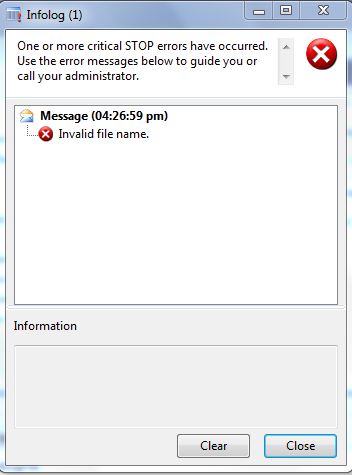
Invalid file name message.

This is the error message you normally get when you use the the wrong file convention, As in the example below I used "\" instead of "\\" in the file path, as AX only excepts "\\":

static void ReadingFile(Args _args)
{
    TextIo      inputFile;
    //This syntax is for reading file in a local machine, we always use "\\" instead of "\"
    // AX does not read "\"
    inputFile = new TextIo("C:\test.txt", 'R');
    if (inputFile)
    {
        info("File found");
    }
}


Solution:

static void ReadingFile(Args _args)
{
    TextIo      inputFile;
    //This syntax is for reading file in a local machine, we always use "\\" instead of "\"
    // AX does not read "\"
    inputFile = new TextIo("C:\\test.txt", 'R');
    if (inputFile)
    {
        info("File found");
    }
}

This is the correct way. Same goes for network path, you need to use "\\\\" instead of "\\", as shown below:

static void ReadingNetworkFile(Args _args)
{
    TextIo      inputFile;
    //This syntax is for reading file in a local machine, we always use "\\" instead of "\"
    // AX does not read "\"
    inputFile = new TextIo("\\\\AXServer\\test.txt", 'R');
    if (inputFile)
    {
        info("File found");
    }
}


Stack trace: Invalid attempt to call WinAPI::findFirstFile running in CIL on the client.

Stack trace: Invalid attempt to call WinAPI::findFirstFile running in CIL on the client

This error you will normally encounter when running a batch job. The issue is that batch processing doesn't suppport WINAPI::findFirstFile method. Actually I was trying to find a file in the folder and moving to some other folder, you can use this alternative:

public void run()
{
System.IO.DirectoryInfo di;
System.Type arrayType;
System.Array array;
System.IO.FileInfo fi;
FilePath filePath, moveFilePath, shortFile;
int i;
int l;

;

super();

    baseFolder = tEC_InterfaceSetup.TEC_DefaultFolder +"\\";
    di = new System.IO.DirectoryInfo(baseFolder);
    arrayType = System.Type::GetType("System.IO.FileInfo");
    array = System.Array::CreateInstance(arrayType, 1);
    array = di.GetFiles("*" + #txt);
    l = array.get_Length();


    if (l > 0)
    {
        //Find the files in the base folder and iterate.
        for (i = 0; i < l; i++)
        {
            fi = array.GetValue(i);
            mainFolder = fi.get_FullName();
            foundBaseFileName = fi.get_Name();  
         //**********Your logic************
        }
        
        InterfaceTransfer::moveFile(foundBaseFileName , moveFilePath);
    }
}


server static void moveFile(str fileName, str newFileName)
{
    #File
    Set                 permissionSet;
    permissionSet =  new Set(Types::Class);
    permissionSet.add(new FileIOPermission(fileName,#io_write));
    permissionSet.add(new InteropPermission(InteropKind::ClrInterop));
    CodeAccessPermission::assertMultiple(permissionSet);
    System.IO.File::Move(fileName, newFileName);
    CodeAccessPermission::revertAssert();
}


Hope this helps.


System.IO.IOException: The process cannot access the file because it is being used by another process.

If you encounter this error that mean that you are trying to access a file which is not closed at the moment. The file your trying to access is still open, below is the screen-shot:


Solution:

The solution is that you simple need to close the file the TextIO class. For closing the file you neeed to use this syntax:

TextIo inputFile;
;

inputFile.finalize();

// This will close the file and then you can proceed with your remianing operation on the file.